Launching a store isn’t hard. Launching a store that converts, stays stable, and scales without messy rework is the real challenge. Most teams underestimate what “complete” means—so they go live with missing pages, weak discovery, broken tracking, or no operational sync.
This guide is a practical, build-ready checklist of ecommerce website features across three areas: must-have pages, core online store features (functions), and essential ecommerce integrations. Use it to plan your build, audit an existing store, or compare agency proposals without scope surprises.
Want a fast, conversion-ready store with the right ecommerce website features? Contact Lucidly—or message Lucidly on WhatsApp for a quick checklist review.
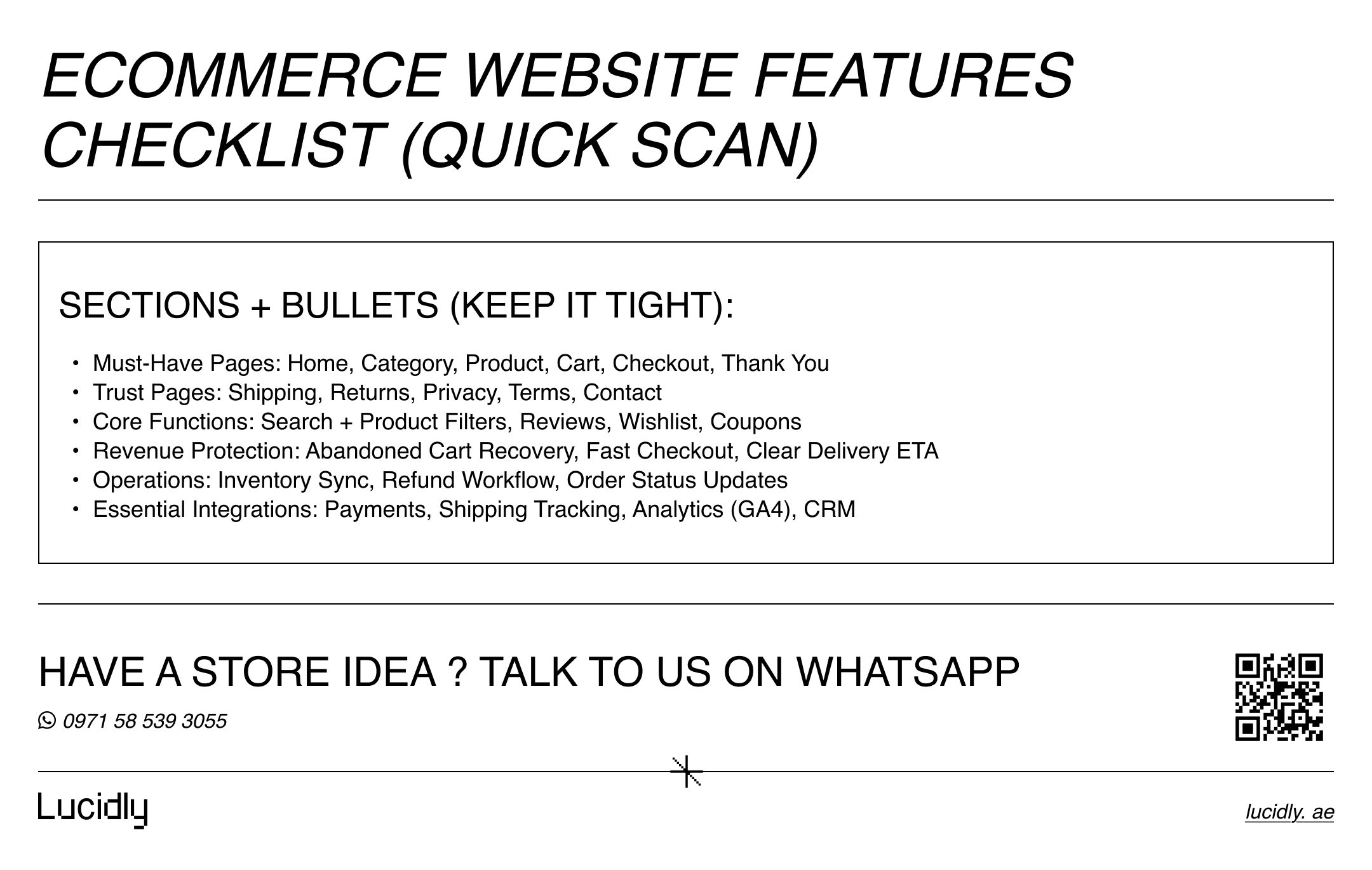
The Ecommerce Website Features Checklist (Quick Overview)
Before we go deep, here’s a fast overview you can screenshot and use for scoping. Think of this as an ecommerce functionality checklist you validate in meetings and quotes.
Pages (must exist):
Homepage, Category/Collection, Product, Cart, Checkout, Thank-you
About, Contact, Shipping, Returns, Privacy, Terms
FAQ, Track Order, Support/Help
Core functions (must work well):
Search + product filters, sorting, clear navigation
Reviews, wishlist, coupons, and fast checkout
Abandoned cart recovery and order status visibility
Operations (must be manageable):
Inventory, shipping rules, taxes/VAT, refunds, notifications
Roles/permissions (if needed), reporting basics
Integrations (must be connected):
Payments + fraud checks
Shipping carriers + tracking
Analytics + conversion tracking
CRM sync + email/SMS automation
inventory sync if you sell across channels
Now let’s break it down into a clean, implementation-friendly structure.
For a detailed step-by-step approach to building a complete online store in the UAE, check out our guide: Ecommerce Website Development in the UAE.
Must-Have Pages for Every Online Store
Pages aren’t “just content.” They define the customer journey, reduce hesitation, and build trust at decision points. If you want ecommerce website features to drive revenue, your pages must guide discovery → confidence → checkout → support.
Storefront Pages (Customer-Facing Journey)
These are the core revenue pages. If any are missing—or weakly implemented—conversion drops and support tickets rise.
Checklist:
Homepage: clear value proposition, key categories, best sellers, trust signals, and a primary CTA.
Category / Collection pages: scannable layout, sorting, and visible product filters (price, size, brand, availability).
Product page: strong images, variations, pricing clarity, shipping/returns summary, and reviews near the buy button.
Cart: editable quantities, shipping estimate, clear totals, and promo code field if using coupons.
Checkout: minimal steps, guest checkout, multiple payment methods, and friction-free forms.
Order confirmation (“Thank you”): order summary, delivery expectations, customer support links, and tracking scripts.
Tip: Many “feature lists” ignore the thank-you page. Don’t. It’s a high-value page for analytics events and post-purchase guidance.
Trust + Policy Pages (Non-Negotiables)
This is where ecommerce website requirements often get skipped—then compliance and trust become expensive later. These pages should be easy to find (footer + checkout links).
Checklist:
About Us (legitimacy, story, credentials)
Contact (email, phone, WhatsApp/live chat if applicable)
Shipping policy (areas, fees, delivery times, cut-off times)
Returns & refunds policy (conditions, timelines, steps)
Privacy policy (data handling, cookies)
Terms & conditions (legal basics)
When these are missing, buyers hesitate at checkout, and platforms/ads may flag your store depending on your market.
Support Pages That Reduce Tickets (And Increase Confidence)
Support pages aren’t a “nice-to-have.” They protect conversion by answering doubts before payment.
Checklist:
FAQ page (shipping, payments, returns, warranty)
Track Order page (self-serve tracking)
Size guide / compatibility guide (if relevant)
Help center or Support hub (email, chat, WhatsApp routing)
This is also a great place to add internal links to high-intent pages and reduce repetitive queries.
For a deeper look at the UX patterns that improve discovery and conversions, read Ecommerce UX in the UAE: Product Pages, Navigation, and Search That Convert.
Must-Have Ecommerce Website Features (Functionality Checklist)
Pages get people to the decision. Functionality closes the deal. A store can look premium and still fail if discovery is weak, checkout is slow, or trust signals are missing.
This section is the practical ecommerce feature list you should validate during QA.
Product Discovery & Navigation
Discovery is where most stores leak revenue. If customers can’t find the right item fast, they don’t “browse longer”—they leave.
Checklist:
Site search with autocomplete (supports typos and synonyms)
Category navigation that matches how people shop (not internal org structure)
Sorting: best-selling, newest, price low-high, price high-low
Product filters that matter: price, size, color, brand, availability, ratings
“Recently viewed” to support comparison and return visits
If your catalog is large, discovery is one of the highest ROI ecommerce website features you can invest in.
Conversion & Checkout Optimization
Checkout is not a design screen—it’s a decision engine. Your goal is fewer taps, fewer doubts, and fewer surprises.
Checklist:
Guest checkout enabled by default
Short checkout flow (ideally one page or minimal steps)
Autofill-friendly forms and clear error messages
Multiple payment methods and clear currency
Shipping cost visibility before payment
Promo code support (only if you can manage coupons responsibly)
Trust signals near the pay button (returns, delivery timeline, secure payment)
A key point: “More options” can increase complexity. Add features only when they reduce friction or raise trust.
Engagement Features (That Actually Increase Intent)
Some features look impressive but don’t move revenue. The following tend to improve return visits and purchase probability when implemented cleanly.
Checklist:
Wishlist (especially for mid-to-high AOV products)
Back-in-stock alerts (low effort, high impact)
Product comparison (useful in electronics, appliances, B2B catalogs)
Cross-sells/upsells that are relevant (not spammy)
Bundles or “Frequently bought together” where it makes sense
These online store features matter most when traffic is paid, because they improve the value of each click.
Trust & Social Proof (Build Confidence Where It Matters)
Trust must appear on the product page and near checkout—not hidden on an “About” page.
Checklist:
Visible reviews with rating breakdown
Review moderation to prevent spam but keep authenticity
Product Q&A (optional, powerful for complex products)
Clear delivery expectations and returns summary on product pages
Badges only if real (avoid fake trust icons)
Trust is not a single element—it’s a consistent experience across the journey.
If you want a more detailed guide to site architecture, filter control, canonical strategy, and schema markup, see Ecommerce SEO for UAE Stores: Architecture, Filters, Canonicals, and Schema.
Customer Accounts: Do You Need Them?
Many teams assume accounts are mandatory. In reality, it depends on your selling model.
Checklist:
Guest checkout (must-have)
Accounts for convenience: order history, address book, faster checkout
Loyalty points or membership pricing (only if you can maintain it)
B2B needs: roles/permissions, company accounts, approval flows
Customer accounts can be a strong ecommerce website features add-on—if they reduce friction and improve retention.
For guidance on structuring your UAE store for search engines and boosting organic visibility, see: Ecommerce SEO for UAE Stores: Architecture, Filters, Canonicals, and Schema.
Ecommerce Website Requirements for Operations (Admin & Inventory)
A store isn’t just the frontend. Your back office must handle inventory, refunds, shipping rules, and reporting without constant manual work. This is where many online shop requirements get ignored—then scaling becomes painful.
Admin, Catalog, and Order Management
Checklist:
Easy product creation (variants, SKUs, attributes)
Bulk editing and import/export
Order management (statuses, notes, partial fulfillment)
Refund workflow (partial/full refunds, reason tracking)
Automated transactional emails (order placed, shipped, delivered, refunded)
Roles and permissions for team members
Shipping, Taxes, and Returns Logic
Checklist:
Shipping zones and rate tables (by region, weight, cart total)
Delivery ETA rules (cut-off times, weekend handling)
Tax/VAT settings aligned with your market
Return eligibility rules (timelines, condition checks)
Inventory Discipline (Prevent Overselling)
Checklist:
Stock visibility per item and variant
Low-stock alerts
Backorder / pre-order rules (if offered)
Reliable inventory sync if selling in multiple channels
Operational stability is one of the most underestimated ecommerce website requirements—and one of the most valuable.
Essential Ecommerce Integrations (Payments, Shipping, CRM, Analytics)
Integrations are not “extras.” They connect the store to real operations: payment reconciliation, shipping workflows, customer retention, and measurement. If you skip these ecommerce integrations, you won’t just lose efficiency—you’ll lose data and growth options.
Payments & Fraud Protection
Checklist:
Payment gateway integration (with stable uptime)
Apple Pay / Google Pay (where relevant)
Fraud/risk checks (rules, velocity limits, verification steps)
Chargeback and dispute handling basics
Payments should be tested end-to-end: success, failure, refunds, partial refunds, and cancellations.
Shipping & Delivery Integrations
Checklist:
Carrier integration (labels, pickup requests if supported)
Tracking number sync to orders
Customer notifications (email/SMS/WhatsApp depending on stack)
COD logic if applicable (confirmation step, fraud prevention)
Good delivery updates reduce “Where is my order?” tickets dramatically.
CRM & Lifecycle Marketing
If you’re serious about retention, you need customers and orders to flow into a CRM or lifecycle tool.
Checklist:
CRM integration (customer profiles + order history)
Segmentation: new vs returning, high AOV, cart abandoners
Email/SMS automation tool connection
Support tool integration (tickets linked to orders)
This is where must have ecommerce features shift from “launch” to “growth.”
Analytics & Tracking (Measure What Matters)
Checklist:
GA4 ecommerce events (view_item, add_to_cart, begin_checkout, purchase)
Ad pixels (Meta/TikTok/Google Ads where relevant)
Consent/cookie management (if required in your market)
Server-side tracking (optional, improves attribution reliability)
Without clean tracking, you can’t optimize. You’ll only “guess.”
Learn more about optimizing product discovery, navigation, and search to increase conversions in our article: Ecommerce UX in the UAE: Product Pages, Navigation, and Search That Convert.
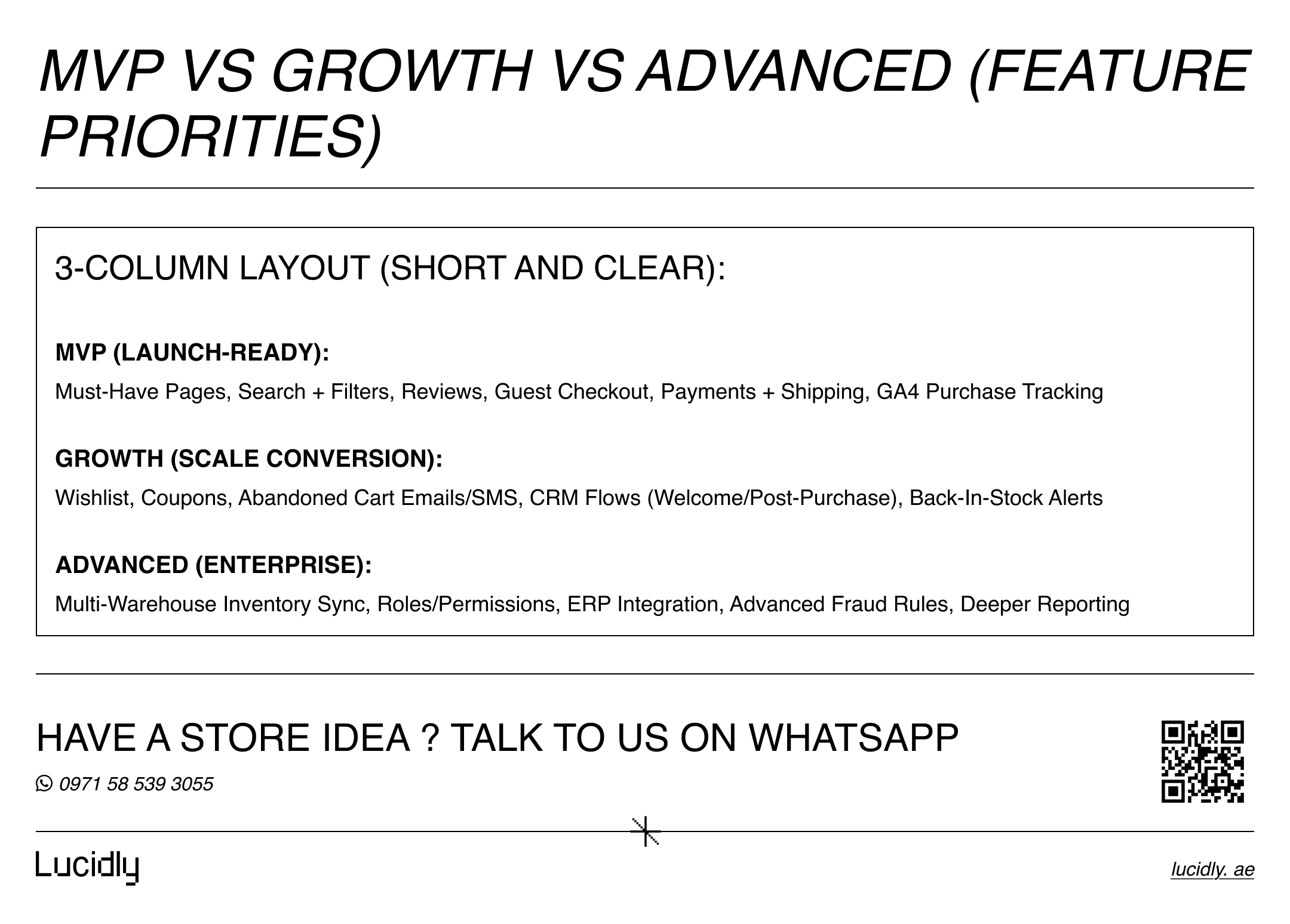
How to Prioritize Features (MVP vs Growth vs Advanced)
Not every store needs everything on day one. The smartest builds prioritize launch stability, then add revenue features, then optimize with advanced systems.
MVP (Launch-Ready Essentials)
If you want a stable launch, confirm these ecommerce website features first:
Full page set (storefront + policies + support)
Search + basic filters + clean navigation
Reviews
Checkout that’s fast and supports guest purchases
Payment and shipping integrations working end-to-end
Analytics purchase tracking
Growth (Increase Revenue and Retention)
Add these next when you have consistent traffic:
wishlist
coupons with clear rules
abandoned cart recovery (email/SMS flows)
CRM sync and automation sequences
Back-in-stock alerts
Advanced (Enterprise / Multi-Channel Complexity)
Consider these when operations demand it:
Multi-warehouse inventory sync
Advanced roles/permissions
ERP integration (if applicable)
Advanced fraud rules and routing
Deeper reporting and attribution stack
This approach keeps your build practical, cost-controlled, and scalable.
If you’re mapping your checklist and want a build plan that matches real UAE buying behavior, explore Lucidly’s Ecommerce Solutions in the UAE for a performance-first approach.
Common Ecommerce Feature Mistakes (And Fixes)
Even good stores can fail from small, repeated mistakes. Here are the ones that cause the most damage.
Mistake (What goes wrong) | Impact (Why it hurts) | Fix (What to do) |
Too many apps → slow site | Slower pages = higher bounce + lower conversion | Use fewer, higher-quality tools. Audit scripts, remove unused apps, optimize performance. |
Weak discovery → shoppers can’t find products | Users quit browsing when search/filters fail | Improve navigation, strengthen search, and align product filters with buying intent. |
No trust near purchase | Buyers hesitate at checkout and abandon | Show reviews, a returns summary, and delivery timelines on product + checkout. |
No abandoned cart recovery | Lost revenue from people who were “almost ready” | Set up abandoned cart email/SMS flows with clear timing and relevant offers. |
No CRM or lifecycle setup | No retention strategy; repeat buyers get neglected | Connect a CRM and start with 3 flows: welcome, abandon cart, post-purchase. |
Inventory issues and overselling | Refunds + negative reviews + support overload | Enforce clean SKUs and reliable inventory sync across channels. |
Avoiding these is often more valuable than adding “fancy” features.
FAQ
What features should every ecommerce website include?
Every store should include fast product discovery (search, sorting, and product filters), trust elements like reviews, a smooth checkout with guest purchase, and essential operations like order management and inventory controls. Beyond that, add retention tools such as wishlist and abandoned cart recovery once traffic is consistent. These ecommerce website features create a complete journey from browsing to repeat purchase.
What pages does an online store need?
At minimum, you need a homepage, category pages, product pages, cart, checkout, and order confirmation page. You also need trust and compliance pages like shipping, returns, privacy, and terms, plus support pages such as FAQs and order tracking. These pages are core ecommerce website requirements because they reduce friction and support conversion.
Which integrations are essential?
Essential ecommerce integrations usually include payments, shipping/carriers with tracking, analytics (GA4 ecommerce events), and a CRM or lifecycle tool to retain customers. If you sell across marketplaces or multiple channels, inventory sync is also critical. The goal is a connected system where orders, customers, and fulfillment data flow cleanly.
Do I need customer accounts?
Not always. Guest checkout is often better for conversion, especially for first-time buyers. Customer accounts become valuable when they reduce friction for returning customers (saved addresses, order history) or when you run loyalty, memberships, or B2B workflows. When implemented well, accounts can be one of the most useful online store features for retention.
In the end, an ecommerce store wins by being complete—not just pretty: the right pages, strong discovery, smooth checkout, and reliable integrations. Use this ecommerce website features checklist before launch and after go-live to avoid costly gaps and build a scalable revenue channel.
Want a store that’s fast, conversion-ready, and built to scale? Contact us —or message Lucidly on WhatsApp to review your ecommerce website features checklist and spot gaps before they cost you sales.
References
Baymard Institute — Checkout usability research & best practices (Baymard Institute)
Google Analytics (GA4) — Ecommerce measurement & recommended events (Google for Developers)
Shopify Help Center — Required policy pages (refund, privacy, terms) + placement (help.shopify.com)