Ecommerce migration in the UAE isn’t a “theme switch.” It’s a controlled revenue-and-visibility project where SEO, catalog data, checkout, and tracking must survive the transition.
Stores that migrate safely rely on disciplined URL mapping, clean 301 redirects, and strict analytics continuity so rankings stay stable and sales don’t dip during launch week.
Stores that migrate safely rely on disciplined Ecommerce Website Development, URL mapping, clean 301 redirects, and strict analytics continuity so rankings stay stable and sales don’t dip during launch week.
Planning an ecommerce migration in the UAE? Message Lucidly on WhatsApp for a quick migration readiness audit.
What a platform move really involves in the UAE (and why it’s harder here)
A platform move is not only development work. It’s ecommerce platform migration and ecommerce replatforming combined: transferring catalog data, recreating key templates, protecting search equity, and re-implementing integrations like payments, shipping rules, and customer communications.
In the UAE, the margin for error is smaller for practical reasons. Mobile behavior is dominant, and even small checkout friction shows up immediately in conversion rate.
Many stores rely heavily on WhatsApp-led support and pre-sales questions, so product pages and category browsing need to remain fast and trustworthy. Add local payment expectations and delivery promises, and a “minor” post-launch misconfiguration can translate into failed orders within hours.
To succeed, you need to protect three outcomes at once: visibility, conversion performance, and measurement. If you lose any one, the business still suffers.
"For a deeper dive into site architecture, filters, canonicals, and schema, see Ecommerce SEO for UAE Stores."
When you should migrate (and when you shouldn’t)
Not every store needs to migrate ecommerce website immediately. Sometimes the real issue is app bloat, weak hosting, poor category structure, or broken measurement—not the platform itself.
Before you decide to move online store to new platform, anchor on two questions:
Is the platform truly blocking growth (SEO, speed, workflows)?
Can your team commit to mapping, QA, and monitoring?
Good reasons to migrate
Here’s when moving is usually justified:
Persistent performance constraints you can’t solve without compromise.
App/plugin complexity inflating costs, slowing pages, or creating conflicts.
Technical SEO limitations (duplicate pages, weak canonical control, filter indexing chaos).
Catalog scale, inventory workflows, or integrations that require a stronger foundation.
Bad timing signals
Here’s when you should prepare first:
Peak demand is near (Ramadan/Eid/major campaigns) and QA time is limited.
Analytics is unreliable today (you’ll be blind after launch).
Your taxonomy is chaotic (migration will copy the mess).
Ops/support aren’t ready for changes in returns, shipping logic, or checkout flows.
If moving is the right decision, treat it like a controlled rollout—not a rushed rebuild.
The biggest migration risks UAE stores face
Most failures aren’t dramatic crashes. They’re silent issues that compound: rankings slip because pages disappear, conversion drops because checkout breaks on mobile, and the team can’t diagnose what changed because tracking is inconsistent.
Before the bullets, keep one principle in mind: risk usually comes from missing documentation and rushed sequencing, not from the platform itself.
Redirect mistakes: missing or incorrect 301 redirects cause broken journeys and ranking loss.
Weak URL mapping: without strict URL mapping, valuable pages lose accumulated authority.
Tracking breakage: losing analytics continuity prevents proper diagnosis (SEO vs checkout).
Downtime: even short downtime windows can cut daily revenue.
Incomplete data migration: missing variants, images, reviews, SEO metadata, or collections hurts trust and sales.
A disciplined ecommerce migration plan reduces these risks by making SEO and measurement first-class requirements.
Pre-migration: SEO + tracking prep (where rankings are protected)
Teams that “build first and add SEO later” often end up rebuilding again. The safest path is to complete discovery, mapping, and measurement baselines before you lock the new structure.
Think of this stage as three deliverables: an inventory export, a mapping sheet, and a measurement baseline.
Crawl and inventory your current store
Lead-in: Before you touch the new platform, you need to know exactly what you’re protecting.
Export all indexable URLs (products, categories/collections, blogs, policies, landing pages).
Capture status codes (200/301/404), canonicals, titles, meta descriptions, and headings.
Identify “gold pages”: top organic landers, top revenue pages, and pages with backlinks.
Build a URL mapping sheet (old → new)
Lead-in: The golden rule is simple—don’t change URLs unless there’s a strong reason.
Keep URLs stable where possible.
When structure must change, map page-to-page (never “bulk to homepage”).
Avoid redirect chains.
Decide how to handle discontinued products (closest substitute vs removal strategy).
Lock analytics continuity before you build
Lead-in: If measurement is not stable before launch, you won’t know what broke afterward.
Document GA4 ecommerce events, parameters, and conversions.
Save a 28-day baseline (organic sessions, revenue, CR, AOV, checkout drop-off).
Confirm pixels and ad events that must remain stable.
Done properly, this prep stage is the core of ecommerce migration success—because it prevents surprises after launch.
For a performance-first ecommerce migration in the UAE, explore Lucidly’s Ecommerce Solutions in the UAE to protect SEO, redirects, and tracking while you move platforms.
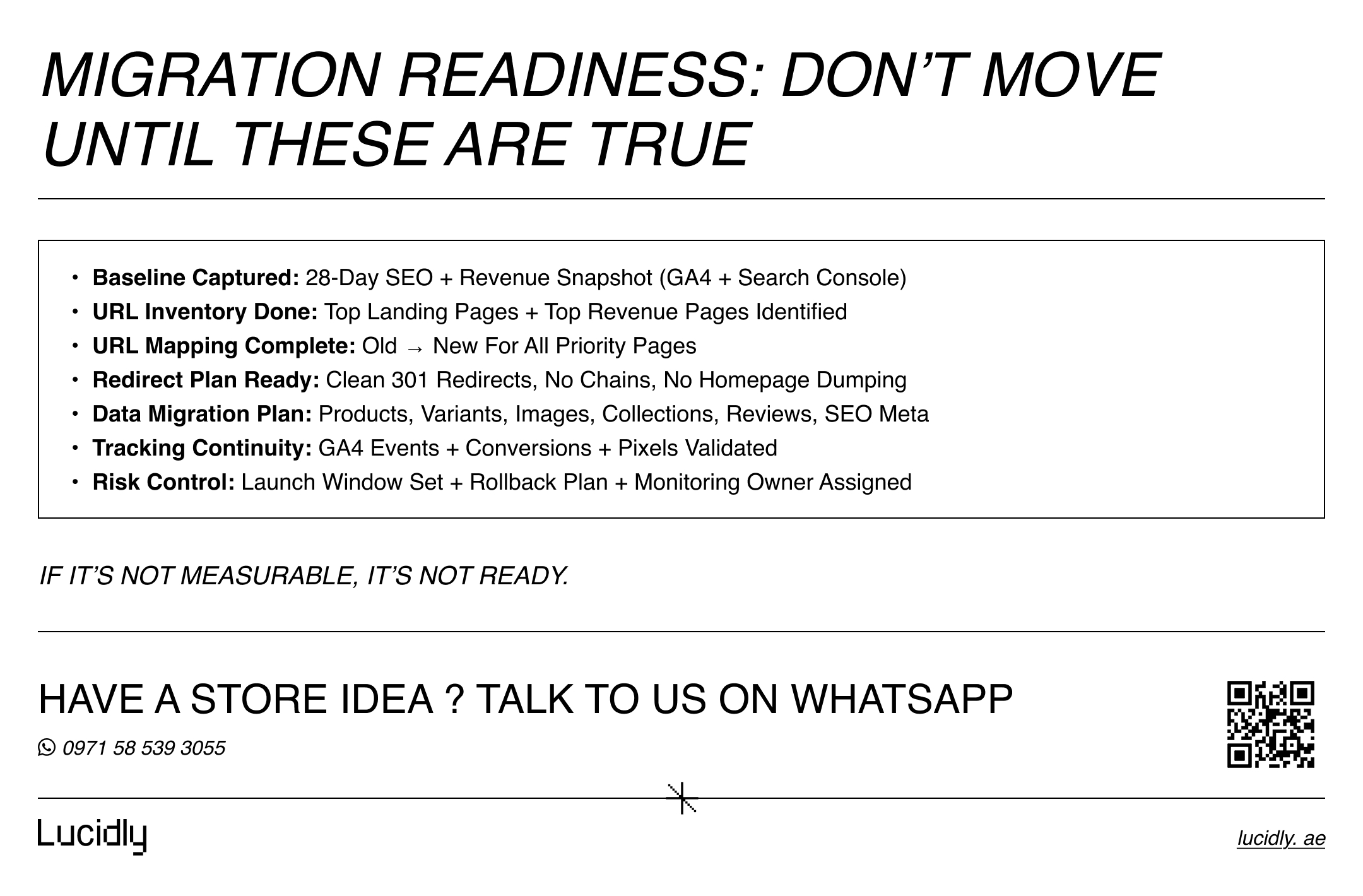
Data migration: what must move (so revenue doesn’t dip)
Data is not “products only.” During a replatforming project, missing or mismatched data creates friction that looks like a conversion problem—even if traffic stays stable.
Before the sections, split the work into “revenue-critical” and “trust/SEO-critical.” You need both.
Revenue-critical (must migrate)
Lead-in: If this layer is incomplete, sales are affected immediately.
Products, variants, SKUs, attributes.
Pricing rules and discounts (where applicable).
Inventory and stock rules.
Categories/collections and merchandising logic.
Shipping zones/rates logic and payment setup.
Trust + SEO-critical (strongly recommended)
Lead-in: This layer protects confidence and search relevance.
Images/media (correct sizing) and key content blocks.
Reviews/ratings (if they influence purchase decisions).
Meta titles/descriptions and structured content where relevance matters.
Policy pages (shipping, returns, privacy) to reduce checkout hesitation.
A disciplined data migration approach keeps conversion stable during ecommerce migration.
Choosing the path: Shopify migration vs WooCommerce migration
Platform moves aren’t symmetrical. A shopify migration has different risks than a woocommerce migration, and the safest path depends on your operating model.
Before comparing, anchor on this: the platform should reduce friction for your team, not create ongoing workarounds.
Shopify migration: stability and speed
Lead-in: Shopify often fits stores that want a strong hosted baseline and faster operations.
Strengths: hosted stability, admin usability, ecosystem
Risks: app bloat (cost + speed), edge-case URL constraints
Focus: keep URL structure stable where possible, audit apps for performance, validate tracking
WooCommerce migration: flexibility and ownership
Lead-in: WooCommerce suits teams that need deeper control, but it demands operational discipline.
Strengths: customization, ownership, advanced workflows.
Risks: plugin conflicts, maintenance overhead, performance discipline required.
Focus: hosting + caching + CDN, strict plugin policy, security and updates operations.
Whichever route you choose, treat the move as a controlled ecommerce migration project—not a theme swap.
Store migration checklist (UAE-ready) — 7 to 14 days before launch
This section is designed to be copied into a project board. It prevents last-minute chaos and protects the business during rollout.
Lead-in: Assign an owner and a pass/fail test for each item. If it can’t be tested, it isn’t done.
Freeze major content changes 7–14 days pre-launch.
Export important URLs and identify top revenue landing pages.
Finalize URL mapping for priority pages.
Implement 301 redirects page-to-page (avoid chains).
Confirm filter/canonical rules to prevent duplicate indexing.
Complete data migration for catalog + key content.
Test checkout end-to-end on mobile (cart → payment → confirmation).
Test shipping logic (zones, rates, ETA) and returns policy clarity.
Validate analytics continuity (GA4 events + conversions + pixels).
Prepare downtime + rollback plan and launch outside peak hours.
Submit new sitemap, confirm robots.txt, verify indexability.
A strong checklist is the operational backbone of ecommerce migration because it turns “hope” into control.
Redirects & URL mapping: the SEO-preservation engine
If you perfect one piece, perfect this. SEO loss usually comes from missing pages, wrong destinations, or messy redirect logic.
Lead-in: Redirects are not magic. Their value comes from clean mapping and correct destinations.
Use your mapping sheet as the single source of truth.
Prioritize top landing pages and top revenue pages first.
Avoid redirect chains; one hop is best.
Don’t redirect discontinued products to irrelevant pages.
Test the top 50 organic landing URLs after launch and fix issues immediately.
This is the part of ecommerce migration that protects rankings most directly.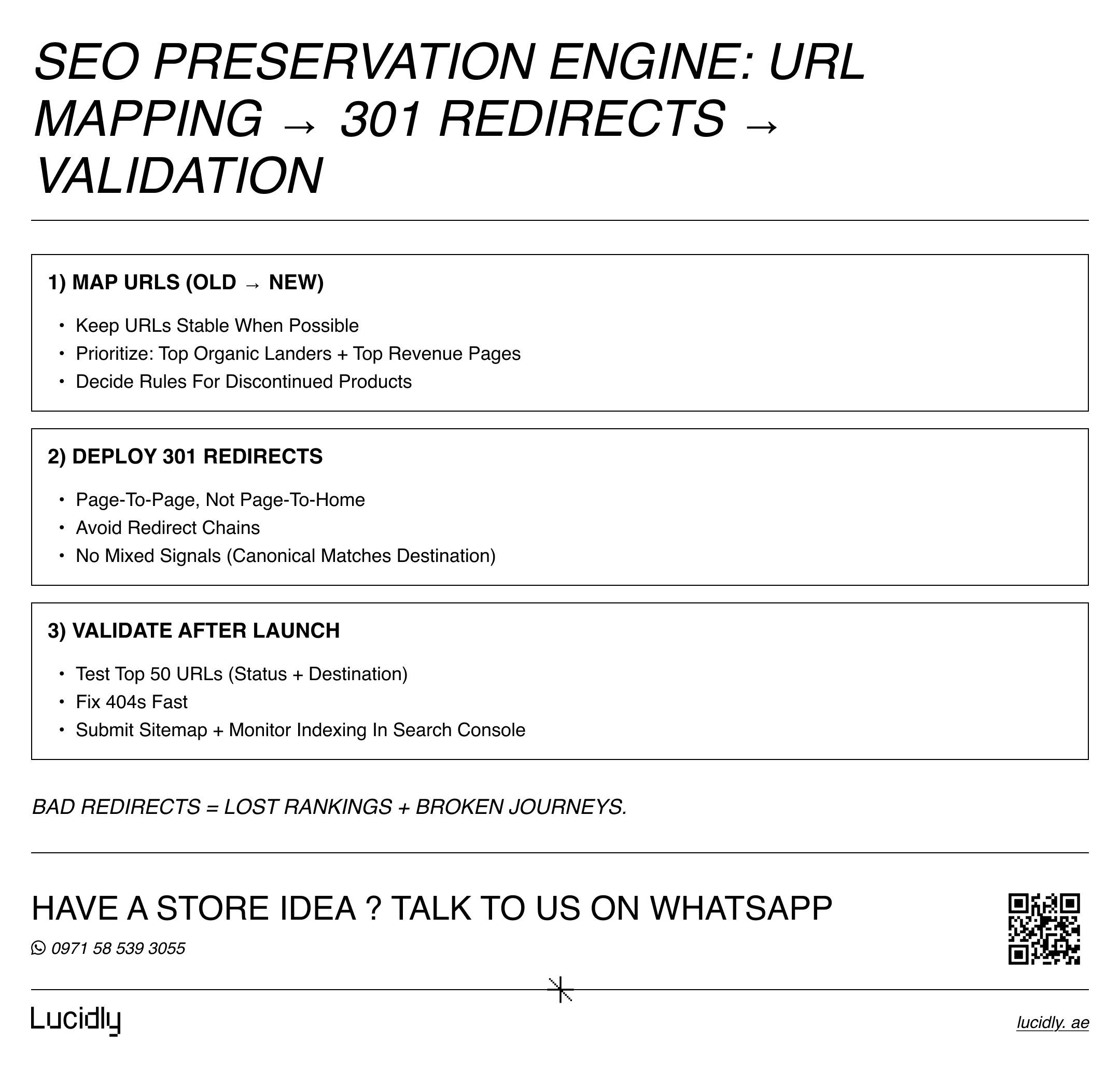
Launch day + first week: prevent revenue dips
Launch is not the finish line. The first week is the stabilization phase: detect issues fast, fix them before they compound, and compare performance against baseline.
Lead-in: Prepare a simple “war room” plan: who monitors, which metrics matter, and what triggers urgent fixes.
Launch day (Day 0)
Lead-in: Your goal is to prove that purchases and tracking work in real conditions.
Run full mobile purchase tests (multiple devices if possible).
Monitor errors (404/500) and fix high-impact pages first.
Confirm GA4 purchase tracking records real transactions.
Verify critical pages are indexable and accessible.
First week (Week 1)
Lead-in: This is where you learn whether issues are SEO, conversion, or tracking related.
Compare baseline vs now: organic sessions, revenue, CR, checkout completion.
Check Search Console coverage and fix “Not found” quickly.
Watch for duplicate pages created by filters/templates.
Improve performance on category/product templates if speed drops.
A disciplined first week makes ecommerce migration feel smooth to customers and search engines.
Post-migration SEO QA: the audit that saves rankings
After launch, don’t assume “the site works” means “SEO is fine.” Run a focused audit to protect indexability, structure, speed, and internal linking.
Lead-in: Treat this as a loop—detect, fix, recheck—especially during the first two weeks.
Indexability: no accidental noindex; robots.txt correct.
Canonicals: correct and consistent.
Sitemaps: clean, updated, submitted.
Internal linking: categories → products → supporting content.
Structured data: Product + Breadcrumb.
Filter control: prevent thin duplicated indexed pages.
Performance: mobile speed and Core Web Vitals focus.
Redirect hygiene: no chains, no wrong destinations.
This QA stage completes ecommerce migration by preventing gradual ranking drops and ensures ongoing Ecommerce Maintenance and Support, keeping your site optimized and fully functional after launch.
FAQ
Will I lose SEO after migration?
Not necessarily. SEO loss usually happens when mapping is incomplete, redirects point to irrelevant pages, or canonical/index rules change unintentionally. Keep important URLs stable where possible, redirect page-to-page when structure changes, and monitor Search Console immediately after launch. Rankings can remain stable—and often improve if speed and structure improve.
What data must be migrated?
At minimum: products, variants, SKUs, pricing, inventory, categories/collections, and images. For conversion and trust, migrate reviews/ratings if they influence purchase decisions. For SEO, migrate meta titles/descriptions and key content blocks where relevance matters, and preserve internal linking relationships.
Ensuring proper Ecommerce Website Development practices helps safeguard both SEO and conversion during migration.
How long does migration take?
It depends on catalog size and integration complexity. A simple store might take 2–4 weeks, mid-size 4–8 weeks, and advanced setups longer—especially with ERP, custom shipping logic, or multi-language structure. QA and validation often drive the real timeline more than development.
What are the biggest migration risks?
The biggest risks are downtime, checkout instability, tracking breaks that kill analytics continuity, incomplete data transfer, and redirect mistakes that cause 404s or ranking loss. A strict checklist, controlled launch window, and fast post-launch fixes reduce these risks sharply.
A UAE platform move succeeds when it protects revenue, rankings, and measurement. Inventory your current site, build strict URL mapping, deploy clean 301 redirects, and maintain analytics continuity to migrate without losing momentum.
Treat launch week as part of the plan, run a focused QA audit, and monitor Search Console daily so you can fix issues fast—because the cleanest ecommerce migration launches recover the quickest.
Planning an ecommerce migration? Message Lucidly on WhatsApp—or book a quick migration audit via our Contact Us numbers.
References
Google Search Central — Site moves with URL changes (migration best practices, redirects, verification, sitemaps). (Google for Developers)
Google Search Console Help — Change of Address tool (domain moves and how Google treats the move). (Google Help)
Google Analytics (GA4) Developer Docs — Measure ecommerce in GA4 (events + implementation guidance for tracking continuity). (Google for Developers)
Shopify Blog — Shopify SEO migration checklist (how to preserve organic traffic during platform moves). (shopify.com)